Private voice keyboard · iPhone · Apple Watch · CarPlay
Speak naturally. Write beautifully.
Talk the way you normally do, ums and all. Larken turns it into clean, ready-to-send text in any app, then forgets your voice. No account. No saved recordings.
- No account or email
- Recordings never saved
- Works in every app
Say it messy. Send it clean.
You talk. Larken writes it the way you meant it.
Larken removes filler words and false starts, fixes punctuation and grammar, and formats the result in the style you pick. Your words, without the ums.
What you say
um so hey team, quick update uh the launch is still on for Thursday I mean actually it's Thursday morning, like around ten. um Priya can you send the final screenshots by Wednesday and uh I'll handle the App Store notes. thanks
What Larken writes
Hey team, quick update: the launch is still on for Thursday morning, around 10. Priya, can you send the final screenshots by Wednesday? I'll handle the App Store notes. Thanks!
An example of each built-in style. You can also create your own, like "Client email" or "Notes to self".
How it works
Tap, talk, done. In any app.
Switch to the Larken keyboard in Messages, Mail, Slack, Notes or anywhere you type. Tap the mic and talk. The polished text drops right where your cursor is.
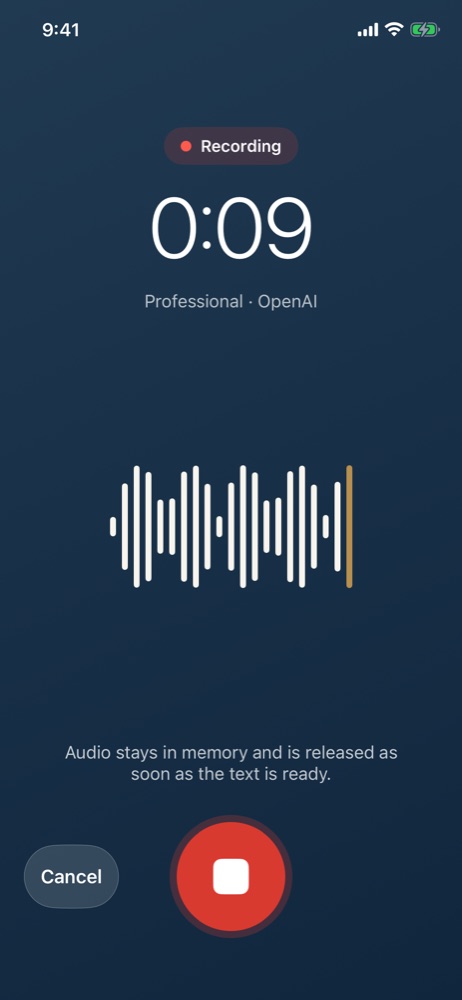
Tap the mic and talk
Speak naturally for up to 5 minutes. Pause for three seconds and Larken stops on its own, or tap Stop.
Larken polishes it
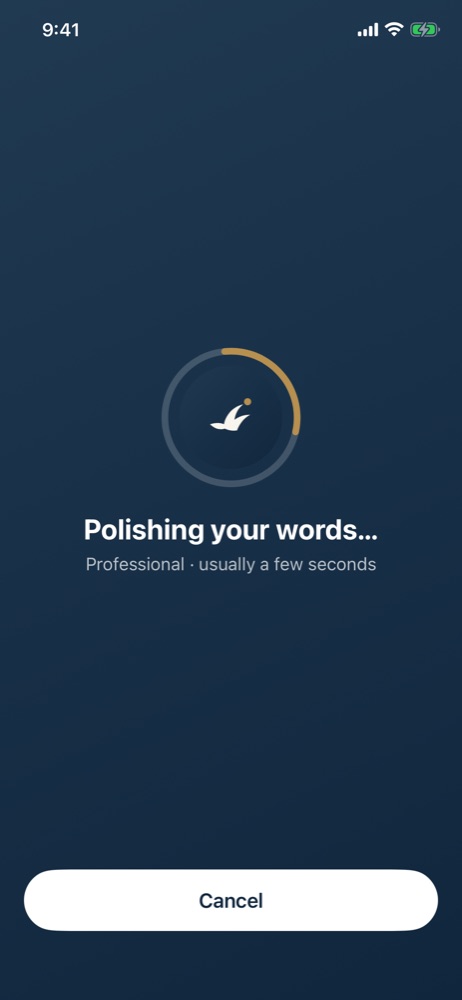
Your speech is transcribed and cleaned up in the style you chose, usually in a few seconds.
It lands where you're typing
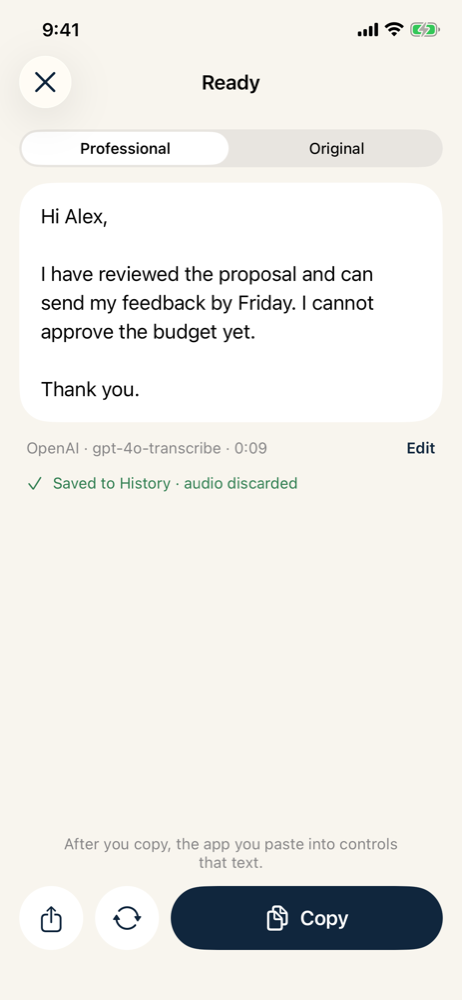
The text appears in your app, ready to send. Flip to the original transcript or reformat it in another style anytime.
iPhone · Apple Watch · CarPlay
Wherever you are, just say it.
Larken isn't stuck in one app on one screen. It works across the Apple devices you already carry, and one subscription covers all of them.
iPhone, in every app
A full keyboard with autocorrect and a mic key. Dictate into any app that has a text field.
- Keep the mic ready for 1, 5 or 15 minutes between dictations
- Optional key haptics
Apple Watch, on your wrist
Raise your wrist, tap and talk. The polished text shows on your watch, ready to send as a message.
- Also waiting on your iPhone keyboard and in History
- Copy it on your iPhone with one tap
CarPlay, on the road
Connected to CarPlay? Larken records through your car's microphone so you're heard clearly, and pauses your music while it listens.
- Uses the car's mic, not a muffled phone in your pocket
- Please keep your eyes on the road and follow local laws
Features
Everything you need to stop typing.
Writing styles
General, Professional and Verbatim built in. Create your own for client emails, Slack updates, notes, anything.
Cleans up as you speak
Filler words, false starts and repetition are removed. Punctuation, capitalization and paragraphs are added.
Stops when you pause
Finish talking and Larken stops after three seconds of quiet. No need to reach for the button.
Always the latest models
Larken uses the newest speech models from OpenAI, like gpt-4o-transcribe. When better ones arrive, you get them in an update at no extra cost.
Private history
Find anything you've dictated. History is encrypted on your iPhone, kept off iCloud Backup, and auto-deletes on your schedule.
Original and polished
See exactly what you said next to the polished version, edit the text, or reformat it in another style.
Bring your own key
Prefer to use your own OpenAI or ElevenLabs account? Connect your key, pay the provider directly, and keep full control.
Request log
See every request Larken has made: when it happened and which provider it went to. Nothing hidden.
Up to 5 minutes
Long enough for a detailed email, a meeting recap or a page of ideas, in one go.
Privacy first
Your voice is yours. We never keep it.
Privacy isn't a setting in Larken. It's how Larken is built. There's no account, no profile and nothing to sell.
No account, ever
We never ask for your name, email, phone number or anything else about you. Your App Store subscription is all Larken needs.
Recordings are never saved
Audio lives in memory just long enough to transcribe it, then it's gone. Not on your iPhone, not on our servers, not anywhere.
Our servers never hear you
Each recording goes straight from your iPhone to the AI provider over an encrypted connection. Larken's servers never receive your audio or your words.
No tracking
No analytics, no ads, no data brokers. You can check every request Larken makes in Settings › Request log.
Pricing
Six months of Larken costs about the same as one coffee.
Every plan starts with 7 days free. You won't be charged if you cancel before the trial ends.
Your own key
For people who want full control and the lowest cost.
$9.99 / year
Just $0.83 a month, billed yearly
- Everything in Larken: keyboard, Apple Watch and CarPlay
- Use your own OpenAI or ElevenLabs API key
- Pay the provider directly, about 36¢ per hour of talking with OpenAI
- Your key never leaves your iPhone's Keychain
- All future updates included
Full service
For people who want it to just work.
$99.99 / year
Just $8.33 a month, billed yearly
- Everything in Larken: keyboard, Apple Watch and CarPlay
- No API key or account to set up; works right away
- One price covers transcription and formatting
- Generous monthly fair-use allowance, never any surprise charges
- Always on the latest speech models
Less than a coffee for half a year. The Your own key plan is $0.99 a month, so six months costs $5.94. On the yearly plan, it's $9.99 for the whole year. With OpenAI, 20 minutes of dictation a day comes to about $3.60 a month, paid to OpenAI.
US prices. The App Store shows local prices in your country. Billed through your Apple Account; cancel anytime in Settings › Apple Account › Subscriptions. OpenAI rates as of October 2026.
Larken vs. built-in dictation
More than speech to text.
iPhone dictation types out what you said. Larken writes what you meant.
| Larken | Built-in iPhone dictation | |
|---|---|---|
| Removes ums, false starts and repetition | ✓ Yes | — |
| Rewrites in a style: email, Slack, professional, your own | ✓ Yes | — |
| See the original transcript next to the polished text | ✓ Yes | — |
| iPhone, Apple Watch and CarPlay in one subscription | ✓ Yes | — |
| Searchable, encrypted history | ✓ Yes | — |
| Choose your AI provider (OpenAI or ElevenLabs) | ✓ Yes | — |
| Works without an internet connection | Needs internet | ✓ On most iPhones |
FAQ
Questions, answered.
Which apps does Larken work in?
Any app where you can type. Larken is a keyboard, so it works in Messages, Mail, WhatsApp, Slack, Notes, Google Docs, your browser and everything else. You can also dictate in the Larken app itself and copy or share the result.
Why does Larken open briefly when I tap the mic?
iOS doesn't let keyboards use the microphone directly, so Larken starts listening in its app. Go back to your app with the "◀" link at the top left and keep talking; the text drops in when you're done. After that, the mic stays ready for a few minutes (you choose 1, 5 or 15), so the next dictation starts right away.
Do I need an account?
No. Larken never asks for your name, email or any personal information. Your App Store subscription is tied to your Apple Account, and Restore Purchases brings it back on a new iPhone.
Are my recordings stored anywhere?
No. Audio stays in memory only until it's transcribed, then it's released. It never touches Larken's servers. Only the finished text is kept, encrypted on your iPhone, for as long as you choose. You can turn history off entirely.
Who processes my voice?
OpenAI on the Full service plan, sent directly from your iPhone. On the Your own key plan, it's whichever provider you connect: OpenAI or ElevenLabs. Larken asks for your permission before sending anything and names the provider. OpenAI says API data isn't used to train its models by default.
Which plan should I choose?
Full service if you want it to just work: no keys, no extra bills. Your own key if you already have an OpenAI or ElevenLabs account, want the lowest cost, or want your data under your own provider agreement. You can switch plans anytime.
How much does my own key cost to use?
You pay the provider for what you use. With OpenAI's gpt-4o-transcribe, that's about $0.006 per minute of audio, roughly 36¢ per hour of talking, plus a tiny amount for formatting. Twenty minutes of dictation a day is about $3.60 a month.
Is there a limit on Full service?
Full service includes a monthly fair-use allowance that comfortably fits normal personal dictation. Each recording can be up to 5 minutes. If you ever reach the allowance, new recordings pause until it resets. You're never charged extra.
Does it work with Apple Watch and CarPlay?
Yes. The Apple Watch app lets you dictate from your wrist; the polished text shows on your watch, ready to send as a message, and waits on your iPhone keyboard and in History. When your iPhone is connected to CarPlay, Larken records through the car's microphone and pauses your music while it listens.
What languages does Larken understand?
Larken uses OpenAI's and ElevenLabs' speech models, which recognize dozens of languages and detect the language automatically. The interface is in English.
What do I need?
An iPhone running iOS 17 or later and an internet connection. The Apple Watch app is optional.
How do I cancel?
On your iPhone, open Settings › your name › Subscriptions › Larken. If you cancel during the free trial, you won't be charged. If you cancel later, Larken keeps working until the end of the period you've paid for.
How do I get help?
Email support@getlarken.com. Include your Support ID from Larken › Settings › Help so we can find your subscription. It doesn't identify you personally.
Stop typing. Start talking.
Try Larken free for 7 days on iPhone, Apple Watch and CarPlay.
Download on the App Store